
ADHD Time Blindness – Why Time Seems to Disappear
Time is something we all rely on, but it does not always feel easy to judge. Ten minutes can somehow turn into an hour, a task that looked quick can take much longer than expected, and a deadline that felt far away can suddenly become urgent.
For some people with ADHD, difficulties noticing, estimating and planning around time can be especially frustrating. This is often described informally as time blindness. In this article, I’ll look at what that can feel like in everyday life, why it may be associated with ADHD, and some practical ways of making time easier to see and work with.
What Can Time Blindness Look Like?
Have you ever walked into your room, lay down on your bed, opened your phone aiming to scroll for 10 minutes and an hour has gone by? Have you ever had an appointment at 4:00, saw that it was still 02:45 and decided that you don’t need that long to get ready and ended up being late? Have you ever underestimated how long your assignment will take to complete and end up rushing two hours before the deadline? Those moments can feel like poor planning or a lack of discipline, but they may also reflect difficulties with perceiving and estimating time — something often described as time blindness.
Time blindness can take form in many ways. Misjudging your time to get ready thinking it would take 30 minutes but it ending up taking an hour, planning to quickly organise your desk before you start your work and ending up cleaning your whole bedroom for the next 3 hours, playing a video game at 11:00 PM and looking up to see it is suddenly 3:00 AM.
Its not just about “being late”; it can involve difficulty estimating, noticing and planning around time.
What Is ADHD Time Blindness?
ADHD time blindness is an informal term used to describe difficulties with perceiving the passage of time, estimating how long activities will take, and using time effectively to guide behaviour. It is commonly associated with ADHD, but it is not itself an official diagnosis or diagnostic criterion.
ADHD is usually defined around inattention, hyperactivity and impulsivity, while problems with perceiving and estimating time are generally treated as secondary features. Some researchers have argued that difficulties with time perception may be a more important feature of ADHD than current diagnostic criteria recognise.[1]
Time blindness is an informal term rather than an official ADHD symptom or diagnosis.
In everyday life, it can show up as underestimating how long it takes to get ready, becoming completely absorbed in an activity and losing track of time.
Why Can ADHD Affect Our Sense of Time?
Research has found differences in time perception and estimation among people with ADHD, including difficulty judging how much time has passed and how long tasks will take. Some researchers have argued that these difficulties may represent an important part of ADHD, although “time blindness” is not currently an official diagnostic criterion.
But what does ADHD have to do with time?
You see, time perception is subject to each individual and the experience of the passage of time and the process of arranging ones life all comes down to your cognitive function. ADHD can affect several cognitive processes involved in planning, attention and working memory. One example could be that some individuals may spit time into two zones: “Now” and “Not now”. That may mean that your time perception may only ever work in the “Now”.
Another important factor to consider is the inability to judge your Time Horizon. The time horizon can be considered as a fixed point of time in the future. Think about a time when you had a task to do but it was still several months away so you decided to put it off because hey, what’s the worst that can happen right? The same thought runs through my head with every non-urgent task and next thing you know, someone created a time machine and transported me the day before the deadline making the task super urgent and super important. Great..
Time Management Planning and Coordinating Time is another common pitfall. This usually involved setting clear goals, prioritising tasks by importance and scheduling the necessary blocks for work and rest.f you suffer from ADHD, you may know well all the struggles of finding the perfect app or planner to help you do this to run your life but ultimately ending up at another roadblock. Trust me, I know this feeling all too well. I have several unused planners, notebooks where I’ve started a new planning system such as Bullet Journal or even apps such as Todoist or Apple Reminders. All to find out that they are all hard work to keep up with and no fun to do. I usually spend more time setting it up than actually using it.
Time Blindness vs Poor Time Management
People who are frequently late, underestimate tasks or lose track of time are often told they simply need to “manage their time better”. For some, this may be the case and it does come down to poor time management. For others, they may be experiencing time blindness.
Poor time management might involve knowing the task takes an hour but choosing to leave it till the last minute. Time blindness might involve genuinely estimating that the same task will take 20 minutes and being surprised when it takes much longer.
Here are a couple of examples to iterate the difference:
Poor time management: “I know it takes 45 minutes to get ready, but I started late.”
Time blindness: “I thought getting ready would only take 15 minutes”
Poor time management: “I knew I had two hours of work and chose to scroll instead”
Time blindness: “I opened my phone for what felt like 10 minutes and realised 50 minutes had passed”
However, it isn’t as clear cut as that. For some individuals, the two can overlap. Someone can struggle to perceive time accurately and also make planning decisions that don’t help them. The point I am trying to make isn’t to excuse every missed deadline or late arrival we have had in our lives; it’s to recognise that “just manage your time better” may not address the underlying difficulty.
The difference matters because a planning problem and a perception problem may need different solutions: one may benefit from better scheduling, while the other may need external tools that make time more visible.
What Can Make Time Blindness Worse?
The below are examples of what potentially could make it worse.
- Becoming deeply absorbed in something. When attention is locked onto an interesting activity, it can be easier to miss external time cues.
- Tasks with no natural stopping point. Scrolling, gaming, researching, editing or organising can continue indefinitely unless something interrupts them.
- Frequent interruptions. Constantly switching attention can make it harder to keep a clear sense of how long the overall task has taken. It can take time to reorient after an interruption.
- Tiredness or poor sleep. This can affect attention and make planning more difficult. Whilst it doesn’t directly affect time blindness, it can impact the factors that cause time blindness.
- Stress or feeling overwhelmed. When attention is consumed by other concerns, monitoring time may become harder. If you are already rushing to finish one task while thinking about three others, checking how much time has passed may drop even further down your list of priorities.
- Unfamiliar tasks. It can be much harder to estimate duration when you don’t yet know how many steps something involves. I don’t know about you un uncertainty can make me uneasy and cause me to overplan.
- Hidden transition time. Getting ready, finding things, travelling, logging in, packing up and switching between tasks often take longer than the main activity estimate suggests.
Recognising the situations where your sense of time becomes least reliable can be useful, because those are the moments when external reminders, timers and extra buffer time may matter most.
Ways to Make Time More Visible
- I don’t need mean to point out the obvious, but: use a clock. No, seriously. Having a clock in a more visual location where you can easily see it makes a lot of difference.
- Not a normal clock but a visual countdown timer. A normal clock tells you what time it is but a countdown will show you how much time you have left. That can make an abstract block like “30 minutes of scrolling” much more concrete.
- Set transition alarms, not just appointment alarms. Instead of one alarm at 4:00 for an appointment, use one at 3:00 to start getting ready and another at 3:35 to set off.
- Try this exercise next time you are doing something. Estimate first, then record the real time. Before starting a task, write down how long you think it will take. Afterwards, compare your estimate with reality. Over time, this can help you notice which tasks you consistently underestimate.
- Break invisible preparation time into steps. “Leave at 08:15” might actually mean shower, get dressed, pack your lunch, find where you last put your keys, feed the cat and then get in the car and leave at 08:15. Writing those steps down makes the hidden time much more obvious.
- Use time blocks with visible boundaries. Instead of “work on assignment this afternoon”, turn that into “2:00-2:30 research, 2:30–3:00 outline, 3:00–3:30 first section.”
- Add deliberate buffer time. If something normally takes 30 minutes, planning 40 or 45 can protect against underestimation and distractions.
- Use reminders that tell you what to do. This may be more energy consuming than the others on this list but if it helps, it helps. “Appointment at 4” is less useful than “Start getting ready now” or “Leave the house in 10 minutes.” Adding a reminder for each step can help keep you on track and prevent any distractions from taking you off course.
- Make deadlines visible earlier. If a deadline is Friday, set your own visible target for Wednesday or Thursday so the task does not only become urgent at the last moment. Remember to set realistic deadlines, don’t make it only an hour earlier when you know that wont work.
- Use analogue or visual time tools if they work for you. Some people find a visual timer easier to process than a digital number because they can literally see the remaining time shrinking.
Instead of relying on an internal sense of time that may be inconsistent, these strategies make time something you can see, check and respond to.
What I’m Experimenting With
Out of the list above, I’ve personally been experimenting with four of these. That’s not to say they will work for you or the others won’t so please experiment with each.
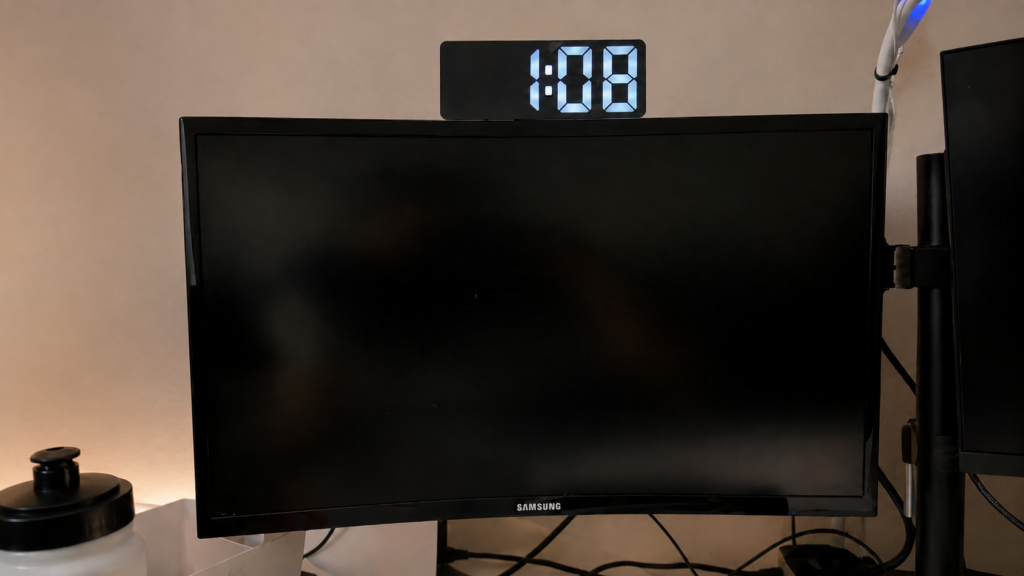
First out of everything, I would recommend having a visual clock. Before, I used to rely on my phone but that made me get distracted every time i would check the time so i decided to attach a digital LED clock very crudely to the top of my monitor with some 3M double sided tape. This little step has helped me pick up on time cues much more frequently as the time is always visible without the risk of notification distractions.
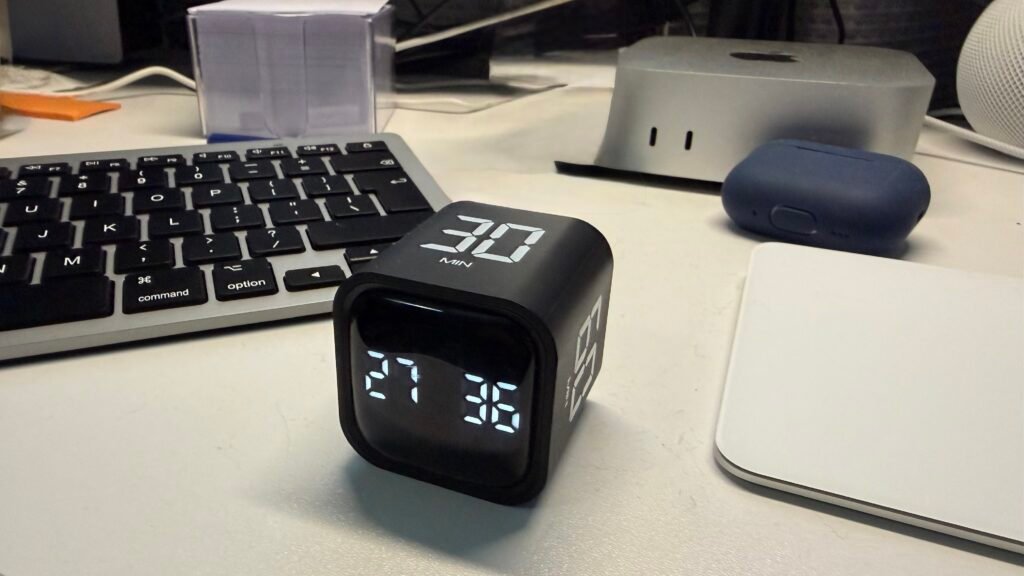
The second thing I would recommend is the use of a Pomodoro timer. A Pomodoro timer is a great way of preventing time blindness by only dedicating a certain amount of time to the task. I like to use this little device. I recommend it as its very simple and easy to use and does not require seventeen buttons to be pressed to set the correct time.
Next I would like to recommend the Estimate first, then record the real time method. I have tried this personally with my morning routine before work and found it actually takes me 10 minutes longer than I thought it did! I then set my morning alarm to go off ten minutes earlier and the morning rush suddenly disappeared.
Another great one is to use time blocks with visual boundaries. I like to do this when I’m writing these articles to prevent perfectionism. I dedicate certain amounts of time to each part to prevent me from spending 80% of my time on the first bit and the last 20% rushing to get it finished.
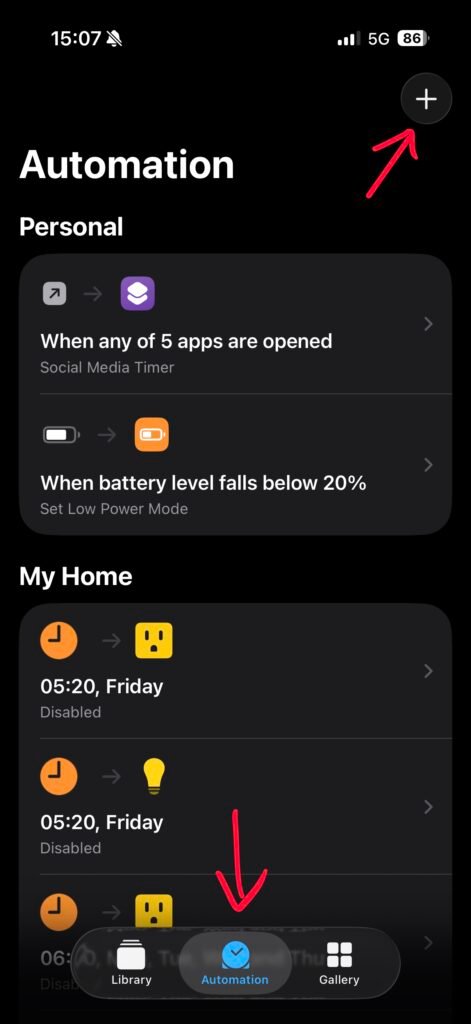
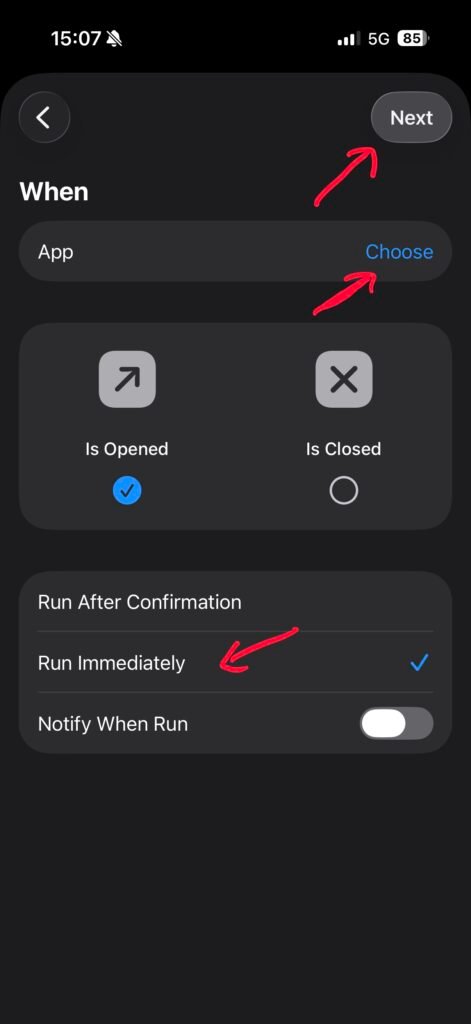
One final thing I would like to recommend which is not included above, is the use of screen time. I used to use Apples built-in Screen Time settings but I just found that I had very little willpower and ignored the screen time notification every time it appeared and felt guilty every time I did it. I have found another way which is much more suited to my liking. I have set up an apple shortcut that starts a 10 minute timer with a loud alarm every time I open social media. So if I do get distracted and open Instagram or TikTok, my 10 minute timer will remind me of what I am doing so I can get back to the task I was originally doing. The shortcut I use can be downloaded here: Social Media Timer Apple Shortcut. To make it work, firs open the Apple Shortcut app and follow the steps below:
1) Press on Automation at the bottom.
2) Select the (+) sign.
3) Search for “App” and select.
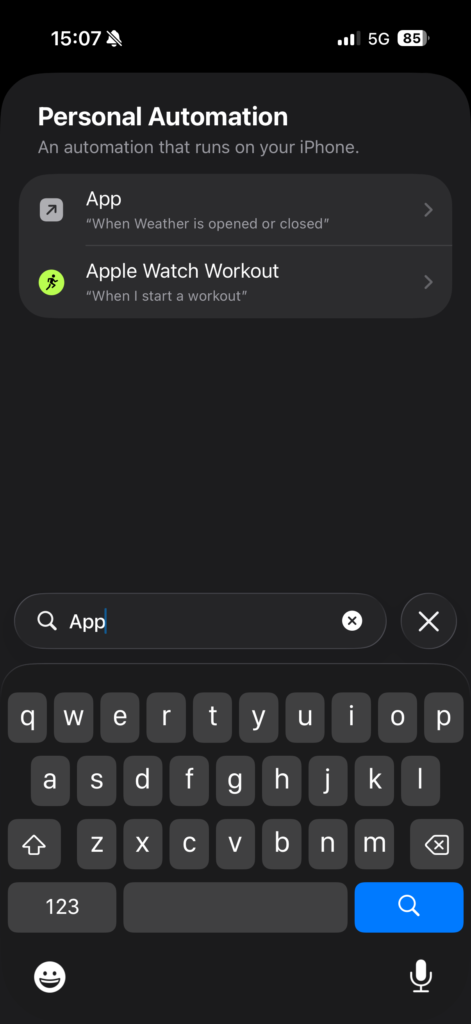
4) Choose which apps you want the timer to run for e.g. TikTok, Instagram etc.
5) Select “Run Immediately”.
6) Click “Next”.
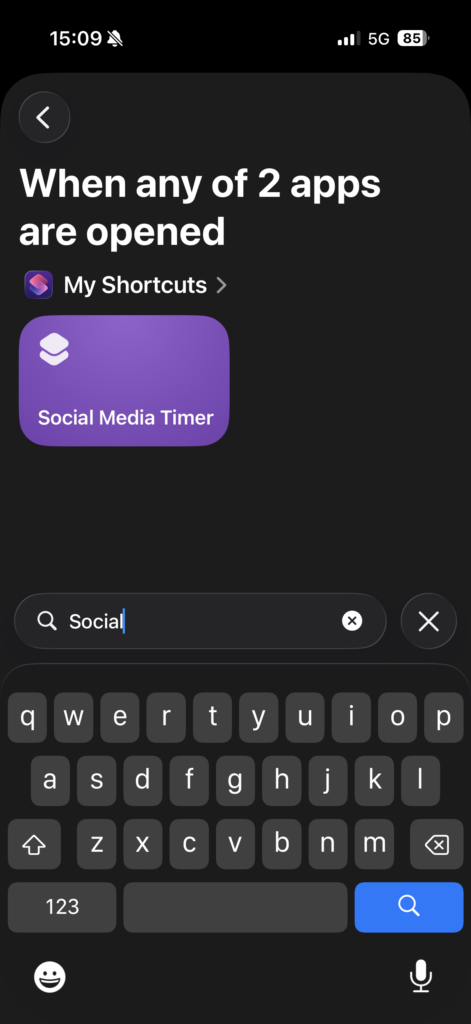
7) Search for the Social Media Timer you just downloaded and select.
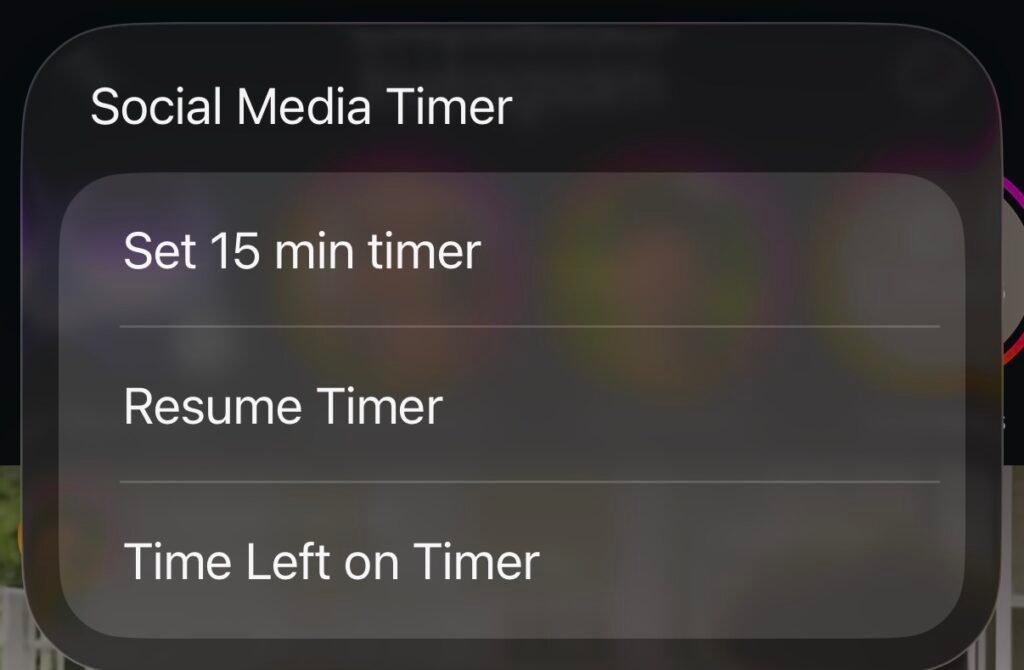
8. Test the end product. once you open the app, you should see a menu like this. “Set 15 min time” will start the timer, “Resume Timer” allows you to resume the timer from where you left off if you switch apps, and “Time left on timer” shows you how much time is remaining.
Final Thoughts
The strategies I’ve discussed are experiments and not universal fixes. Working with time blindness cannot be done with a one-size-fits-all approach. We are all individuals and the best approach would be to find out what works best for you. Some people may find timers more stressful. Or that too many alarms become easy to ignore. Find what works for you.
Time blindness can make something as simple as judging how long a task will take feel surprisingly difficult. The problem is not always knowing what time it is, but being able to notice time passing, estimate it accurately and use that information to guide what you do next.
For me, the most useful approach is not trying to become perfect at sensing time, but finding ways to make time more visible.
Focus in Progress is about exactly that: testing ideas, learning what works, and gradually building better ways to work with our attention rather than against it.